ZEvolve / AI INFRASTRUCTURE Bring verifiable oversight to enterprise AI.
THE CONTROL LAYER FOR ENTERPRISE AI. CHECK / ROUTE / AUDIT

Verification, access, and auditing for enterprise AI

Every AI call.
Backed by evidence.

Verify model behavior. Manage enterprise access. Trace every call.
From APIs to enterprise workflows, bring clarity to how AI is used.

Reviewable evidence Choose products independently Explore local deployment
Built around leading model protocols Claude Messages + OpenAI Compatible + Native Gemini + OpenAI Images See each product for its supported scope

01 / PRODUCT ECOSYSTEM

Three tools.
One connected AI workflow.

From verification before procurement to oversight during use. Choose each tool independently, or combine them for your workflow.

01 / CHECK Live

Model Check

Model Check

Does this API behave the way it claims?

  • Fixed probes for protocol and behavior checks
  • Reconcile token counts and inspect run evidence
  • Share reports and schedule regression checks
Explore Model Check
02 / ROUTE Prototype review

Token Router

Enterprise model access

ONE ENTRY. CONTROLLED ACCESS.
Employee tools Business apps Individual keys
One enterprise AI gateway
TBuy enterprise channels Your own channels

Keep compatible tools. Bring access under one gateway.

  • Individual employee keys and model permissions
  • Manage internal quotas, expiry, and channel groups
  • Connect TBuy or your authorized upstream
Explore enterprise access
03 / AUDIT SaaS live

Token Audit

Call Auditing

AUDIT TRAIL
Call records storedAuthorized capture · tenant encryption 01
Basic rule checksRisk signals · human review 02
Body access loggedRole-based access · log before return 03

See what happened, who viewed it, and the evidence left behind.

  • Authorized capture with per-tenant encryption
  • Basic risk rules and custom keywords
  • Role-based body access, with every view logged
Explore call auditing

Availability: Model Check and Audit SaaS are live. Router Enterprise and local Audit are still undergoing prototype validation.See the accepted scope →

02 / SYSTEM ARCHITECTURE

Clear data flows.
A foundation for control.

Model requests and audit records follow separate paths. Select a node to explore its role and data boundaries.

Combined enterprise deployment · architecture schematic INTERACTIVE / 01—04
YOUR ENVIRONMENT / LOCAL DEPLOYMENT
API request
Authorized forwarding
Side-channel mirror · authorized capture
Separate services. Separate permissions.
Records and encrypted bodies stay in your designated environment.
Model request path Audit data path

01 / CLIENT & APPLICATION

Keep your tools.
Manage identities separately.

Compatible tools that support a custom API URL connect through individual enterprise-issued keys. Employees do not need the provider’s original credentials.

Access boundary

The Claude Code employee-key path has passed acceptance checks. Other clients require individual validation; arbitrary AI websites are not automatically covered.

View supported and accepted scope

03 / LOCAL DEPLOYMENT

Your gateway.
Your environment.

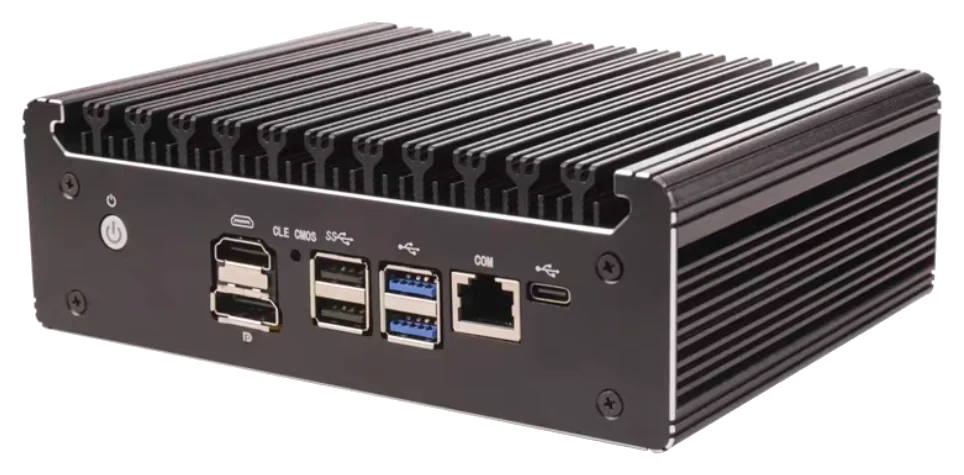
From an N100 mini PC to your existing Linux virtual machines, Token Router Enterprise and Token Audit run as two independent services, keeping access management and call records clearly separated.

Runs locallyCombined deployment with Docker Compose
Independent servicesPinned versions, separate upgrades and backups
Fits your networkConnect through explicit application endpoints
Explore local deployment

Currently a prototype solution. Confirm hardware, capacity, and recovery requirements against the actual workload and agreed delivery scope.

04 / VISIBILITY BY DESIGN

Turn invisible calls
into reviewable records.

From an API check to enterprise call auditing: observe, locate, and review the information behind each decision.

OBSERVE → REVIEW → VERIFY

When issues arise,
follow the evidence.

Find calls by identity, model, and time. Review captured usage and risk signals. When authorized staff view a request or response body, that access is logged too.

Explore Token Audit
TOKEN AUDIT / WORKSPACE Synthetic data · interface example
All values and records shown are synthetic examples, not real business data.

05 / BUILT AROUND YOUR WORKFLOW

Start with your needs.
Choose the right tool.

Build one step at a time. Address the area that needs oversight first, then connect the rest as needed.

FOR DEVELOPERS & PROCUREMENT

Test first. Decide with evidence.

Before adopting a new model API, use fixed probes to check its protocol, behavior, and token accounting. Reports retain the test conditions and evidence for technical and procurement review.

Explore model verification
START WITH A CLEAR SCOPE
  • Prepare the Base URL, key, and model name
  • Choose the protocol and test level
  • Review evidence, limitations, and failures
Suggested start / 24Test Model Check

06 / TRUST THROUGH TRANSPARENCY

Trust through evidence.
Clarity about the boundaries.

Read our trust disclosures
01

Reviewable test logic

Model Check is open source under AGPL-3.0. Reports retain run conditions and evidence, so you can retest the same endpoint.

02

Explicit data permissions

Audit capture follows the authorized scope and uses per-tenant encryption. Viewing bodies requires permission, and access is logged.

03

Affiliations disclosed

24Test and TBuy are both part of Zevolve. Verification and procurement have separate roles, and the affiliation is disclosed.

24Test Check · Route · Audit Affiliated brands / part of Zevolve TBuy Model APIs and tokens

07 / FAQ

Clear answers.
Better decisions.

Product selection, integration, and data boundaries:
here are a few things to know.

Do I need to use all three products together?
No. Model Check works without an account. Call auditing serves enabled enterprise accounts within their authorized scope, and the enterprise gateway can be evaluated separately. Each product has a defined role, connected through links and interfaces.
Does local deployment mean no content leaves the network?
Local deployment can keep audit records and encrypted bodies in your designated environment. Calls to cloud models still send request content to the selected model provider. Keeping inference on your network requires an internal model upstream.
Can this audit every AI website employees visit?
It does not automatically cover arbitrary HTTPS websites or every official client. Tools and applications must explicitly connect to the enterprise gateway, with their protocols, streaming, and special features validated for compatibility.
How many users or concurrent calls can an N100 support?
We do not promise user counts or concurrency based on a device model. Capacity must be assessed against peak requests, streaming connections, body sizes, retention periods, and query load. The current N100 / 16 GB / 512 GB configuration is a prototype.
Are 24Test results a certification?
No. Results are observations from a single black-box run. They cannot prove the underlying model’s identity or a provider’s bill, and do not constitute certification, recommendation, or endorsement. 24Test and TBuy are affiliated brands; we do not claim to be an independent third party.
How can I learn about demos, pricing, and delivery scope?
Explore the Model Check, Router, and Audit demos, then prepare your tools, model services, and audit requirements. No fixed pricing, trial period, or SLA is assumed here. Configuration, authorization, and acceptance criteria depend on the agreed delivery scope. An official contact channel is still to be confirmed; TBuy enterprise-account requests can be handled at tbuy.ai.
BUILD YOUR AI CONTROL LAYER

Take AI further.
Keep oversight in step.

Start by checking an API or preparing your enterprise deployment requirements.

Run a model check Define the use case · Confirm compatibility and delivery scope

DEPLOYMENT BRIEF

Define the requirements first.

Choose your priorities to create a brief you can copy. Everything is prepared in your browser; nothing is submitted or saved.